$ scp foobar.txt your_username@remotehost.edu:/some/remote/directoryCredits to the original post.
Thursday, 9 January 2014
Just to Remeber: using unix scp utility

Wednesday, 18 December 2013
Just to remeber: Replacing something with new line in Emacs
C-M-5 <type something> <enter> C-q C-jCredits to the original post.
Thursday, 12 December 2013
Oracle GoldenGate: Run SQLEXEC within MAP clause only once, accessing @GETENV parameters
As of version 11.2.3.0 of Oracle GoldenGate there is a restriction for standalone SQLEXEC statements, such statements can't access parameters normally accessed with @GETENV function.
To bypass this restriction we should make SQLEXEC within MAP clause to run only once per every replicat invocation.
This can be achieved using global temporary table as target and filtering upon result of @GETENV( "STATS", "TABLE",.. ) function.
So the setup is the following:
At first create global temporary table
create global temporary table gg.tmp_gg_dummy ( id number( 14, 0 ) ) on commit delete rows;
alter table gg.tmp_gg_dummy add constraint tmp_gg_dummy_pk primary key ( id );
This table will be the target table for multiple source tables. As it is created as GTT, we don't have to manually managed inserted records.
Then add the following as the last mapping into your replicat parameter file
map m.*, target gg.tmp_gg_dummy, handlecollisions, colmap ( id = @GETENV ("RECORD", "FILERBA") )
sqlexec( id set_first_seq_no1, spname pk_replication_accounting.set_first_seq_no,
params(a_fileseqno = @GETENV( "GGFILEHEADER", "FILESEQNO" ) ), afterfilter ),
filter (@getenv( "STATS", "TABLE", "GG.TMP_GG_DUMMY", "DML" ) = 0), insertallrecords;
If not added last, this mapping will cause resolution errors.
Let's examine, how it works.
Mapping is resolved using *, so every source table in "M" scheme will match and every operation upon source table will be replicated to gg.tmp_gg_dummy.
INSERTALLRECORDS instructs to transform every operation into INSERT.
HANDLECOLLISIONS prevents PK errors.
As column mapping we need arbitrary value, so we use relative byte address of a record.
The filter will match only for the first DML operation as after replicating one record @getenv( "STATS", "TABLE", "GG.TMP_GG_DUMMY", "DML" ) will return values greater than zero.
And finally we instruct GG to run stored procedure only if the filtering was successful with AFTERFILTER keyword.
Inside SQLEXEC we successfully obtain FILESEQNO value.
Looking at the report file we clearly see that stored procedure was executed only once.
From Table M.EVENTTAIL to GG.EVENTTAIL
       #                   inserts:         26
       #                   updates:         13
       #                   deletes:         0
       #                  discards:         0
From Table M.EVENTTAIL to GG.TMP_GG_DUMMY:
       #                   inserts:         0
       #                   updates:         1
       #                   deletes:         0
       #                  discards:         0
  Stored procedure set_first_seq_no1:
         attempts:         1
       successful:         1
EditSeems that I have missed SQLEXEC optional parameter that instructs GG to execute stored procedure only once per invocation: it's EXEC ONCE. Blame on me, but that proves that GG is flexible enough making it possible for one to repeat this functionality with filter clause.
There are more options in addition to ONCE: MAP, TRANSACTION and SOURCEROW so it's worth checking the reference.
Edit 2
More considerate look at EXEC ONCE and it's description
Executes the procedure or query once during the course of the Oracle GoldenGate run, upon the first invocation of the associated MAP statement. The results remain valid for as long as the process remains running.made me understand that one should create "* to temp table" mapping anyway, plus if you don't want to populate temp table with useless records during invocation, you should use filter with DML stats, or unconditionally ignore all records for that map statement (that's a viable option).
Wednesday, 27 November 2013
Great design: Go to parrent topic link.
SyBooks got some great design insight for hierarchical documentation. All greatness comes from "Go to parent topic" link placed at the end of the document. It's just easy to click that link when you've read or skimmed the whole topic. "Current location" navigation element placed at the top of the page looses that easiness cause you have to read more and to think even more. With "Go to parent topic" link one has no alternatives and she don't even need to know the name of the parent topic. It always leads one level up.
Check it out:
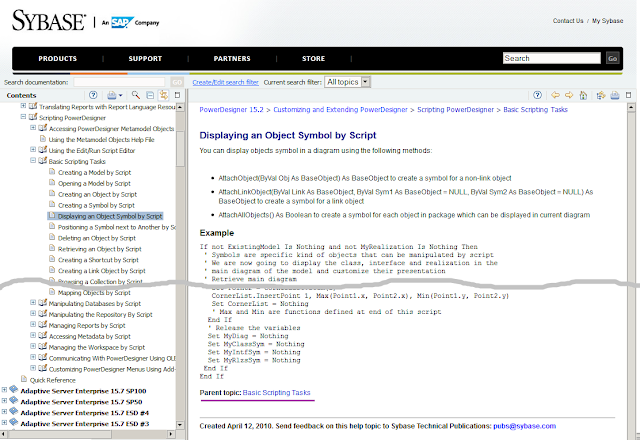
Check it out:

Remains of the Day: An old but overall great post on using and customizing Oracle SqlDeveloper
The best trick learned is to changed default syntax highlighting to more readable one.
Read an article here peoplesofttipster.com/sql-developer.
Tuesday, 26 November 2013
Syntax reminder: Get number of DML operations from GoldenGate replicat report file
This little piece of a bash code lets you obtain number of DML operations from Oracle GoldenGate report file:
#!/bin/sh
dml_cnt=`perl -p -e 's/\s{2,}/\t/g' /opt/oracle/ggate/dirrpt/R1.rpt | awk -F "\t" '($3 ~/(inserts|updates|deletes):/){dml_count += $4} END {print dml_count}'`
Monday, 25 November 2013
Custom listagg function using cursor to bypass ORA-01489
When using build-in listagg function one should always consider that resulting string must have a length less or equal to 4000 characters. If does exceed then an error 'SQL Error: ORA-01489: result of string concatenation is too long' is thrown.
Here's a package implementing a custom aggregate function that bypasses this restriction.
Here's a package implementing a custom aggregate function that bypasses this restriction.
create or replace PACKAGE "PK_UTILS" AS

type ref_cur is ref cursor;

function LISTAGG_CLOB( a_cur in pk_utils.ref_cur, a_delimiter in varchar2 ) return clob;

END PK_UTILS;
/
create or replace PACKAGE BODY "PK_UTILS" AS

function listagg_clob( a_cur in pk_utils.ref_cur, a_delimiter in varchar2 ) return clob
as
  v_single_value clob;
  v_result clob;
begin
  fetch a_cur into v_single_value;
  if ( a_cur%NOTFOUND ) then
    goto FIN;
  end if;
  v_result := v_single_value;
  loop
    fetch a_cur into v_single_value;
    exit when a_cur%NOTFOUND;
    v_result := v_result || a_delimiter || v_single_value;
  end loop;
<<FIN>>
  return v_result;
end;

END PK_UTILS;
/
And here is a small user test emulating 'within group (order by ...)' functionality.
with prepared as (
  select 1 a, 1 b from dual
  union all
  select 2 a, 2 b from dual
  union all
  select 3 a, 1 b from dual
  union all
  select 4 a, 2 b from dual
)
select q.b
  , pk_utils.listagg_clob( cursor( select a from prepared where b = q.b order by a desc ) , ',' )
from (
  select b
  from prepared
  group by b
) q
;/
         B LISTAGG_
---------- ------------------
         1 3,1
         2 4,2
Subscribe to:
Posts (Atom)